
Introducing Nameserver Update: Manage Your GoDaddy-registered Listings Through Afternic
Afternic is a GoDaddy brand, and while you can already sign into Afternic with your GoDaddy account and access DDC Pro features, sellers have told us they want that connection to go further, with more ways to manage their GoDaddy-registered domains from Afternic.
We’re introducing Nameserver Update, the first in a series of planned connectors between your GoDaddy and Afternic accounts. Nameserver Update lets you switch your GoDaddy-registered domain in your connected GoDaddy account to our For Sale landers, directly from Afternic.
That means fewer portfolio gaps, faster For Sale lander activation, and a 33% lower commission rate when they sell.
What Nameserver Update does
Nameservers are the settings that tell the internet where to send visitors when they type in your domain. When listing your domain for sale, pointing it to a For Sale lander gives visitors a clear path to inquire about or buy the domain.
Typically, you have to edit your nameservers through your domain registrar. Until now, making that change for GoDaddy-registered domains meant leaving Afternic, signing in to GoDaddy, finding the domain, and updating the nameservers there.
Nameserver Update brings that workflow into Afternic for eligible GoDaddy-registered domains in your connected GoDaddy account.
- See which of your listed domains are already using Afternic nameservers and which are not. This applies to all Afternic listings, regardless of your registrar. Nameserver checks for sales commission happen separately, at the time of the sale.
- Choose the eligible GoDaddy-registered domains you want to update from the connector flow.
- Switch selected domains to ns1.afternic.com and ns2.afternic.com after authorization.
If you manage a large portfolio, those gaps are easy to miss when you’re tracking hundreds of listings across two logins. Nameserver Update helps you:
- Find portfolio gaps faster.
- Act on them from one place.
- Keep more of your eligible portfolio pointed to landers built to sell.
Enable the connector
From your Afternic Portfolio, you can see which listed domains are not currently pointed to Afternic nameservers and start the update from the Change NS link.
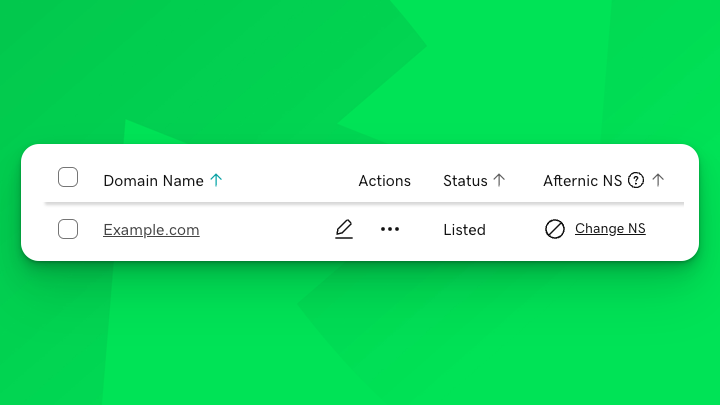
For domains registered outside GoDaddy, selecting Change NS shows instructions for updating nameservers at your current registrar.
For GoDaddy-registered domains in your connected GoDaddy account, Change NS opens a guided flow that lets Afternic update the domain to ns1.afternic.com and ns2.afternic.com after you authorize the connection.
If your GoDaddy and Afternic accounts are not linked yet, you can link them from your Afternic Account Profile. Linking takes a couple of minutes and does not change any domain settings.
If this is your first time using Nameserver Update:
- Select Change NS next to an eligible GoDaddy-registered domain in your Afternic Portfolio.
- In the modal, select Continue to GoDaddy.
- Sign in to your GoDaddy account.
- Complete the first authorization step: Authorize Afternic login with GoDaddy.
- Complete the second authorization step: Authorize Afternic Nameserver Manager.
- Return to Afternic, click “Change DNS” on the domain or domains you want to update, then select Update Nameservers.
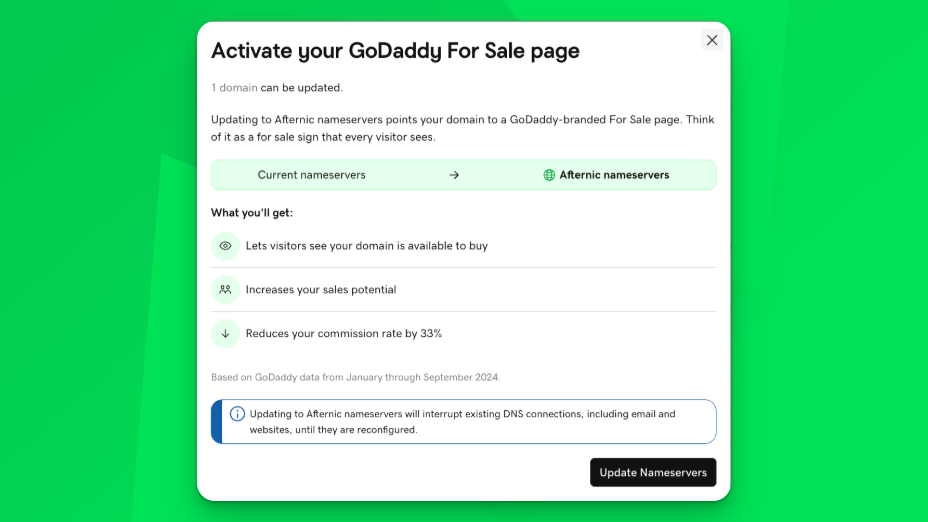
If your GoDaddy and Afternic accounts are already linked, you’ll skip the account-linking step. Select Change NS next to an eligible GoDaddy-registered domain, authorize Afternic Nameserver Manager if prompted, then return to Afternic and select Update Nameservers.
Afternic handles the update from there, switching the selected GoDaddy-registered domains to ns1.afternic.com and ns2.afternic.com.
Bulk updates use the same connector flow, through the “Afternic NS” setting of your footer toolbar. You can review the domains before confirming, and nothing changes until you select Update Nameservers.
It’s important to remember that updating nameservers replaces the domain’s current DNS setup. If the domain currently supports email, a website, custom DNS, or parking, review those settings before switching it to Afternic nameservers.
Ask Portfolio Agent
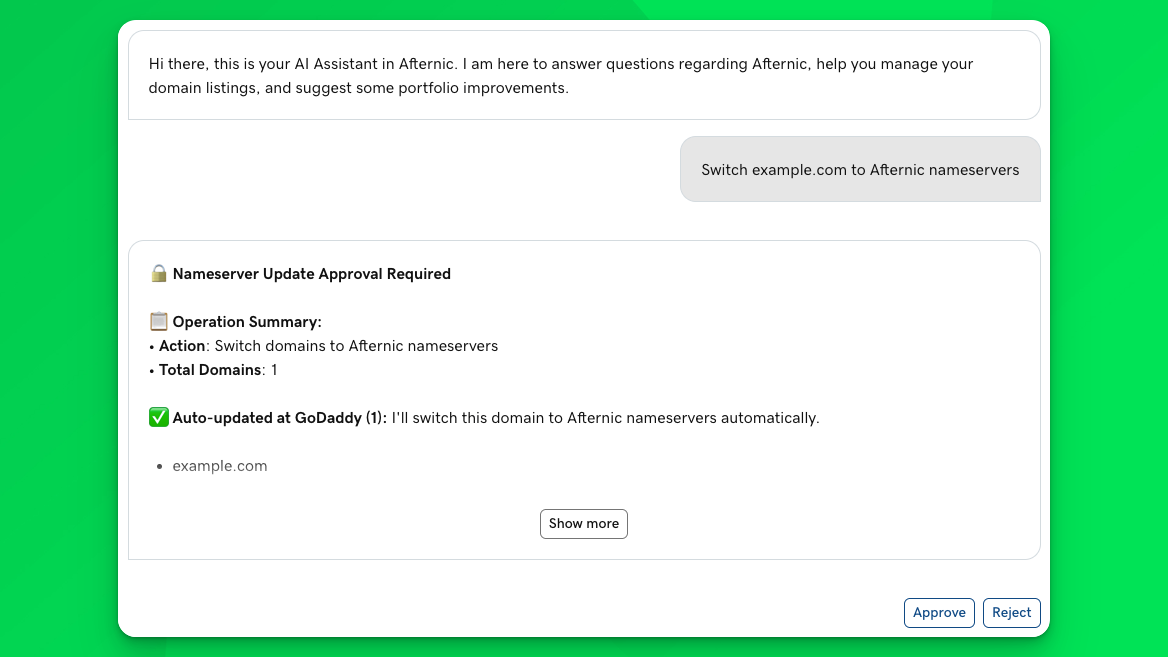
Portfolio Agent, Afternic’s recently introduced conversational assistant, can also help you find GoDaddy-registered listings that are not pointed to Afternic nameservers.
If you manage 500 or fewer domains, ask Portfolio Agent which of your GoDaddy-registered listings are not using Afternic nameservers. It can check your portfolio, show you what it finds, and help you start the switch. You’ll review the proposed updates before anything changes, and no nameservers are updated until you approve them.
Managing more than 500 domains? Portfolio Agent isn’t available at your portfolio size yet. Reach out to the Partner Seller Team at partnerseller@afternic.com if you’d like to try the Portfolio Agent.
What’s next
Our goal with connectors is to make Afternic the central place to manage more of the work behind your GoDaddy-registered listings, so you can spend less time on portfolio management.
Nameserver Update is the first step. It helps you identify listings that are not pointed to Afternic nameservers and, for eligible GoDaddy-registered domains, complete the update from Afternic after authorization. More connectors are on the way, and we’ll share details as each one launches.
To get started, go to your Afternic Portfolio and look for Change NS next to listings that are not using Afternic nameservers.
If you have feedback, or there’s a connector you’d like to see next, send it to domaincommunity@godaddy.com.
Happy selling!

Featured posts
Automated Ownership Verification for GoDaddy Domains in Your Linked Account
Ownership verification is now automated for domains registered in your linked GoDaddy…
Introducing the Afternic Resolution Center: Greater listing control for every seller
Key takeaways When a domain listing needs attention, you need clear next…
Introducing Nameserver Update: Manage Your GoDaddy-registered Listings Through Afternic
Afternic is a GoDaddy brand, and while you can already sign into…